
Self-Hosted LinkTree Alternative: LinkStack
LinkStack is a free, self-hosted alternative to LinkTree that runs on Docker.


TL;DR: LinkStack is a free, self-hosted alternative to LinkTree that runs on Docker. It gives you full control over your "link in bio" page with themes (yes, even a Minecraft one), analytics, and privacy. I use it to power my own landing page at jermad14.com.
💡This post may contain affiliate links, meaning I make a small commission on purchases you make. This costs you nothing and helps me buy more home lab gear!
Why I Ditched the "Link in Bio" Services
We've all seen them on Instagram and Twitter (or X, whatever we're calling it this week). Those "link in bio" pages that act as a traffic cop for your online identity. They are incredibly useful, but I've always had a beef with the popular hosted options like LinkTree.
First, there's the branding. Unless you pay a monthly fee, you're essentially a billboard for their service. Second, there's the privacy aspect. I'm a home lab enthusiast; if I can host it myself, own my data, and not pay a subscription for a static page, I'm going to do it.
That's when I found LinkStack.
What is LinkStack?
LinkStack is an open-source, self-hosted link management solution. Think of it as your own personal landing page that you control 100%. It’s designed to be lightweight, fast, and remarkably easy to customize.
Unlike a static HTML page that you have to edit manually every time you have a new project, LinkStack comes with a slick Admin Panel. You can drag and drop links, check privacy-friendly analytics, and even manage multiple users if you want to host pages for your friends or family.
My Setup: Inside jermad14.com
I don't just write about this stuff; I use it daily. If you visit jermad14.com, you're looking at a LinkStack instance running right out of my home lab.
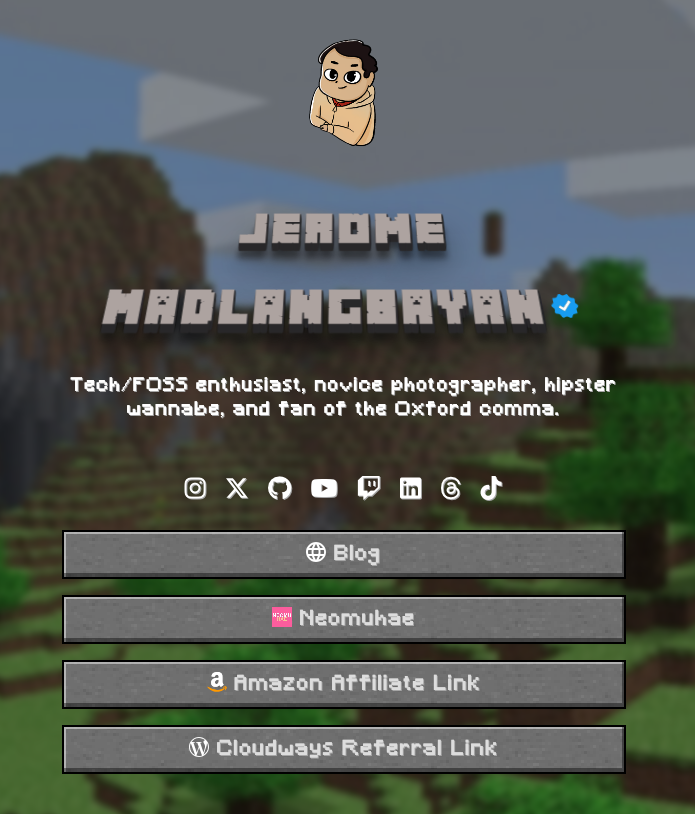
I kept mine intentionally minimalist. My goal was a clean hub that directs people to where they actually want to go without distractions. Here is how I have it set up:
- The Avatar & Bio: A quick "Who am I" so visitors know they're in the right place.
- The Blog: The top button, naturally.
- Affiliate & Project Links: Easy access to my recommended gear and side projects like Neomuhae.
The best part? If I want to change the order or add a temporary link for a new YouTube video, I just log into my dashboard, drag the button to the top, and hit save. No code changes, no re-deploying containers.
The "Wow" Factor: Themes & Customization
One thing that surprised me was how polished the themes are right out of the box. I stick to a clean, "vanilla" look, but LinkStack has some fun options included by default:
- Galaxy: A dark mode theme with a subtle, animated background.
- Minceraft: Yes, there is a theme that mimics the Minecraft title screen. It's nostalgic and surprisingly functional.
- Auto-Dark Mode: Themes can respect your visitor's system settings, switching between light and dark modes automatically.
If you're CSS-savvy, you can inject custom code to make it look exactly how you want. But for 99% of us, the built-in customization for button colors, shapes, and fonts is more than enough.
How to Install (The Easy Way)
Since we're home labbers, we're going to use Docker. It is by far the easiest way to get LinkStack up and running. Here is a simple docker-compose.yml snippet to get you started:
version: '3.8'
services:
  linkstack:
    image: linkstackorg/linkstack:latest
    container_name: linkstack
    environment:
      - [email protected]
      - TZ=America/New_York
    ports:
      - "8080:80"
    volumes:
      - ./data:/htdocs
    restart: unless-stopped
A Few Quick Notes:
- Ports: I mapped port
8080on my host to port80in the container. You'll access the setup screen athttp://your-server-ip:8080. - Volumes: The
./datafolder will be created in the same directory as your compose file. This is where your database and uploaded images will live, so they persist even if you delete the container.
Once the container is running, just head to the URL in your browser, create your admin account, and you're done. It really is that fast.
Final Thoughts
LinkStack is one of those "quick win" services for a home lab. It takes five minutes to set up, but it provides immediate value by giving you a professional-looking, centralized profile.
If you're tired of renting your identity from big platforms, spin up a LinkStack container tonight. It’s free, it’s yours, and honestly, it just looks better.